This is the second in a series of articles, collaboratively written by data and solution architects at Myers-Holum, Inc., PRA Health Sciences, and Google, describing an architectural framework for conversions of data warehouses from Teradata to the Google Cloud Platform. The series will explore common architectural patterns for Teradata data warehouses and outline best-practice guidelines …
This is the second in a series of articles, collaboratively written by data and solution architects at Myers-Holum, Inc., PRA Health Sciences, and Google, describing an architectural framework for conversions of data warehouses from Teradata to the Google Cloud Platform. The series will explore common architectural patterns for Teradata data warehouses and outline best-practice guidelines for porting these patterns to the GCP toolset.
David Chu, Knute Holum and Darius Kemeklis, Myers-Holum, Inc.
Michael Trolier, Ph.D., PRA Health Sciences
July 2018
Table of Contents
⇒ Capture versus land
⇒ Capture is a formal contract with the source system
⇒ Nuances of landing data
⇒ Checklist for evaluating your source data capture processes
⇒ ETL is still the most robust and platform portable tool for implementing your source data capture processes
⇒ Implementing the Landing Zone on Google Cloud Platform
⇒ Sample scenarios for Landing Zone implementations
⇒ Wrap-up, what’s next
Recap: In the first article of this series, “Article 1: Understanding Your Current Data Warehouse”, we discussed source data capture as the first architectural layer of most data warehouses. We categorized the three types of source capture processes (pull, push or stream) and the typical Teradata implementation strategies for landing the data into the data warehouse for each type of process.
We recommended conversion rather than re-implementation of your current source data capture processes as a very important aid to facilitate side-by-side validation of your converted data warehouse. We also recommended the creation of a unified landing model, as an architectural component we called the “Landing Zone”. All source data capture activities target the Landing Zone with associated control processes managing the accessibility and lifespan of those slices of captured data.
In this article, we will discuss detailed requirements you should consider in your implementation of the Landing Zone. An understanding of these requirements will facilitate your decisions on whether existing Teradata source data capture processes can truly be converted.
Conversion versus Re-implementation: As you read this article, we are going to differentiate between approaches for converting your data warehouse from Teradata to the Google Cloud Platform versus re-implementing your data warehouse in Google Cloud Platform. Arbitrarily, we are going to assume certain differences between the two approaches. The conversion project will be assumed as justified based on an expense reduction/capital spend avoidance ROI model, and therefore the cost of the conversion must be constrained to fit within this cost reduction model. We would also expect the implementation timeline to be oriented toward a single deliverable, and timed such that the next Teradata infrastructure upgrade can be avoided.
On the other hand, the re-implementation project will be assumed as justified based on a business benefit model, with implementation (capital) costs factored into the internal rate of return for the project. We would also expect the implementation timeline to be phased into multiple deliverables based on the order of business initiatives you want to undertake.
⇒ Capture versus land
Your existing Teradata implementation first captures data from various sources of record, then lands the data either in some form of staging (flat files, relational tables or XML formats) or loads it directly to your data warehouse. Let’s discuss the capture and land processes separately.
⇒ Capture is a formal contract with the source system
This is important to remember. We doubt your original data warehouse implementers had rights to access any source data of their choosing without regard to operational system impact, data security constraints, or IT infrastructure considerations. They worked out a “contract” with the stakeholders of that source data repository, within which the source capture process operates today.
So in the analysis to determine the extent you can convert your existing source capture processes, it is important to separate the analysis of how well the contract meets the business need, from how well the actual source capture process is implemented. Over time you may have created a variety of methods in which you implemented the actual source capture (BTEQ to TPT to ETL). Clearly, you can define scope within your conversion process to standardize the implementation method without impacting the underlying contract it operates within. Saying this in another way, you may consider the modernization of your source capture processes while striving to deliver the same dataset as before.
It is when you decide the contract no longer meets the business need that you cross from conversion to re-implementation. If the majority of source data contracts no longer meet the business need, then you should be able to quantify those business requirements to justify the additional cost of a re-implementation, especially considering that source data capture changes will make automating side by side testing against the existing Teradata data warehouse much more difficult.
⇒ Nuances of landing data
All relational databases, Teradata included, enforce data integrity through the use of pre-defined schemas and data definitions that include type, length, and nullability. Therefore, there is always a data quality component to landing captured source data into a relational database. Specific functionality may be added to your source data capture processes to handle source data that does not meet these minimal requirements. Below are some examples of how you may be handling this:
ETL (Informatica PowerCenter) – Generates a flat file store (BAD files) of any source records rejected by the target.
Teradata Utilities – Populate error tables if any source records are rejected because of source format, data conversion, or constraint violations.
So in the analysis to determine the extent you can convert your existing source capture processes, it is important to determine which of those processes are depending on BAD files or error tables, either to stop the capture process entirely, or provide a mechanism to analyze and potentially correct and recycle the bad source data. Knowing which source capture processes rely on the data integrity provided by the relational database is needed to best understand which Google Cloud Platform product can supply similar capabilities.
⇒ Checklist for evaluating your source data capture processes
You can use the following checklist to help evaluate the extent that conversion rather than re-implementation of your current source data capture processes will be possible:
Are the majority of your source data contracts meeting business needs? If not, are the new business needs quantifiable and able to justify a re-implementation approach?
How have the various source data capture processes been implemented? For example, via ETL or BTEQ scripts or via an external scripting tool (shell, perl)
Do you have a few standardized implementation patterns or are they all source specific implementations?
How portable are each of the implementations assuming Teradata was removed?
ETL would be very portable, especially if the ETL tool (PowerCenter, Talend, etc.) directly integrates with Google Cloud Platform.
External scripting that implements all the control flow and merely calls out to a Teradata utility to execute specific SQL commands would be fairly portable, assuming you implement the equivalent utility in the specific Google Cloud Platform product.
Teradata specific scripting especially when the control flow is embedded within that script or when Teradata specific features are used (INMOD) would not be very portable.
Note that there are several metadata analysis tools that will greatly help with this assessment (Manta Tools).
Which of the various source data process capture processes have downstream data quality requirements?
Requirement to meet data type, format, and nullability standards.
Requirement to standardize data (“CA”, “CALIF”, “California” all become “CA” )
Requirement to cleanse data (“102 Main” becomes “102 E. Main St.”)
Requirement for a less formal schema (hyper-changing source formats)
Which of the various source data process capture have integrated balance and control processes?
Source capture process also captures control totals (counts, sum checks) about the capture itself.
These control totals are then used by independent processes to validate completeness of all data movement.
To what extent have your source data process captured lineage metadata?
How pervasive is the use of this metadata within your organization?
⇒ ETL is still the most robust and platform portable tool for implementing your source data capture processes
The more you have used ETL to implement your existing source data capture processes for loading your Teradata data warehouse, the easier your conversion will be. If you have Teradata specific source data load processes you need to modernize, you should consider re-implementing them in ETL.
ETL can efficiently access both your on premise source systems as well as cloud sources (Salesforce, Google Analytics).
ETL can source data using a variety of access methods (SQL query, database log, message queue, or application API) in both batch and real-time.
ETL provides source to target lineage metadata.
ETL vendors now have both on premise as well as cloud versions of their toolsets.
It is important to note the above comment applies to the source data capture processes only in a conversion type project. In a future article, we will discuss ETL in comparison to other approaches like Google Cloud Dataproc or Cloud Dataflow.
⇒ Implementing the Landing Zone on Google Cloud Platform
Logical Design
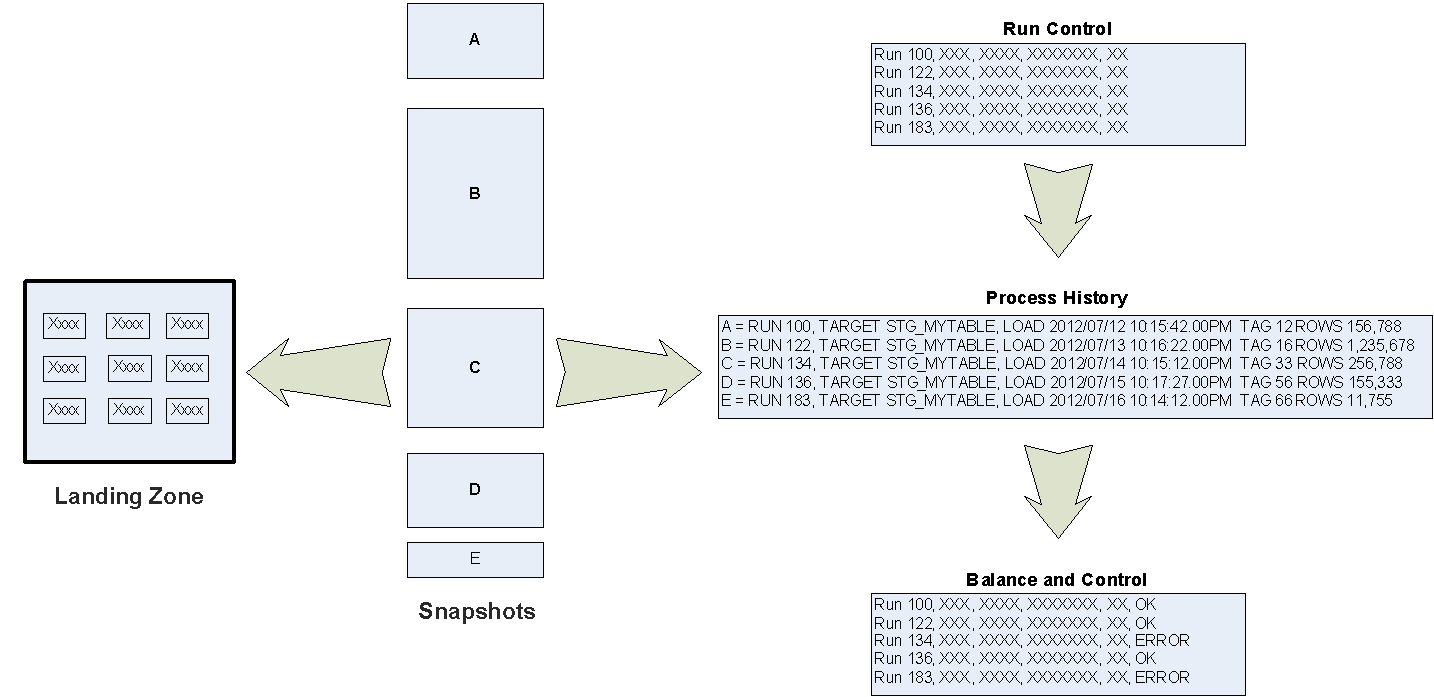
First, let’s show the logical design for the Landing Zone. This is the portion that reflects the final target (persisted data) of the source data capture process. This is the component that will be implemented in Google Cloud Platform.
Within the above diagram:
Landing Zone – Represents instantiated data located in one or more Google Cloud products.
Snapshots – Represents a specific set of captured source data (finite window).
Run Control – An entity of the Balance and Control schema that records the start of a run to capture data from one or more source systems.
Process History – An entity of the Balance and Control schema that records the status of the attempt to capture source data.
Balance and Control - An entity of the Balance and Control schema that records the control totals (counts, sum checks) applicable to a specific capture of source data, plus the state of its independent validation.
Implementation Design
Now let’s discuss the key rules for implementing the Landing Zone as the final target in your source data capture processes:
What the snapshot represents:
For additive only based sources, the snapshot reflects a specific timestamp or aggregate within a time window.
For delta sources, the snapshot reflects all changes (CRUD) for a specific timeframe. Note that the merge of changed data coming from sources with the old state of data does not occur during the landing process.
For full replace sources, the snapshot reflects a full set of source data as of the specific extract timestamp. Like with delta sources, comparison of the latest source data with the previous version does not occur during the landing process.
Use minimal transformations:
The Landing Zone should represent raw source data as much as possible, as it is the recovery point for when transformation errors occur.
Only transformations needed to support data type, format and nullability constraints are needed.
Data quality standardization and cleansing is not performed here, it is performed after the original source data is captured (in a later architectural layer).
Only an insert path is implemented, data in the Landing Zone is never updated or deleted except in special circumstances (like a data repair scenario)
The Landing Zone is the final target, but you can still utilize local intermediate targets. For example, you may have IT security constraints that dictate how PII data has to be specifically encrypted and copied to Cloud Storage.
Other Implementation Considerations
As you plan for the implementation of your Landing Zone, you should consider if you have the following requirements:
Partitioning the Landing Zone – Snapshots of source data contained in the Landing Zone typically reflect an interval of time, with most subsequent access to Landing Zone data qualified to a specific range of time. Therefore, it is very common to implement a date based range partitioning scheme (like a Teradata PPI).
Archiving and removing snapshots of data – Along with partitioning, consider your requirements for archiving and purging data in the Landing Zone. Typically, you want to define an SLA for how long snapshots are retained. The primary reason for retaining data in the Landing Zone, once it is processed into the data warehouse, is to ensure the raw data is still available if any downstream processing errors occurred. As end users actually use the data warehouse, the risk of discovering undetected transformation errors diminishes over time. It is a common practice to retain the original snapshots for around 90 days, after which it is archived or data is purged. Consider Google Cloud Platform technologies that support partition level operations (like Teradata DROP RANGE) to avoid the cost of purging data row by row.
Join Support – Google Cloud BigQuery is the Google recommended technology for implementing your data warehouse. Depending on how you design your data model, you may find multiple source tables need to be joined together and loaded in BigQuery as a single data stream (multi-source/single target). For example, in your logical data model you have ORDER_HEADER, ORDER_ITEM and ORDER_DETAIL entities, but you de-normalize it in BigQuery to a single ORDER entity using nested fields. In this case, you likely need to join multiple source tables to load the ORDER entity. In a future article we will discuss BigQuery de-normalization trade-offs, but be aware of the Landing Zone impact for now.
Data Lake Support – As a repository for raw source data, the Landing Zone can be a component of your Data Lake architecture. As you look at which specific Google Cloud products you want to use to implement the Landing Zone, consider that products ability support your data mining needs.
Physical Design
Now that you captured the source data and know how to move it to Google Cloud (ETL is still the most robust and platform portable tool), the next question is where exactly to actually store this data. The Landing Zone can be instantiated in one or more Google Cloud products. Typical requirements that help identify which Google Cloud product to use are:
Is the data structured or unstructured?
Is there a need to support hyper-changing source data formats / schema?
Is there a need for strong data typing, data formatting, and nullability constraints?
Is there support for SQL joins or does the API support efficient child record lookups?
Can the Google Cloud product easily archive or remove captured source data after a period of time?
Is the Google Cloud product compatible with your desired ETL/ELT toolsets?
Is the Google Cloud product compatible with your desired data mining tools?
Is the Google Cloud product serverless no-ops or does it require you to manage nodes?
Google provides a high-level overview of the Google Cloud storage options on this page. Let’s review in more detail various requirements and how they map to Google Cloud Storage and Database technologies as they apply to the Landing Zone.
Data Technologies & Landing Zone | Comparison Table
Product
Storage Type
Unstructured and Structured Data
Hyper-changing Source Formats / Schema
Strong Typing, Formatting, Nullability
SQL Joins
Archival or Purging
Supported as a Data Mining Source (Data Lake)
Infrastructure Maintenance Effort
Cloud Storage
Just Files
Structured / Unstructured
Yes
simple files
No
Not Natively
from BQ, not as fast as BQ
Yes
Yes
from BQ, not as fast as BQ
None
CloudSQL
Relational store hosted MySQL and Postgres
Structured
Manual alter table
Yes
Yes
Manual
Yes
Medium
Spanner
Relational store with interleaved child tables
Structured
Manual alter table
Yes
Yes
Manual
Limited
Small(2)
BigQuery
Columnar store with repeated nested structs
Structured / Unstructured
Yes
autodetect schema
Yes
Yes
Yes
time-partitioned tables
Yes
None
BigTable
NoSQL wide table (many columns)
Semistructured Name/Value Pairs
Yes
add more columns
No
Not Natively
from BQ, not as fast as BQ
Yes
Yes
from BQ, not as fast as BQ
Small(2)
Datastore
Object store with name/value pair attributes
Structured
Yes
add more attributes
No
No
No
Manual
Limited
None
“Not Natively” indicates that it can support SQL joins through federated BigQuery capabilities
“Small” indicates the need to scale up virtual nodes when capacity is exceeded.
Structured and unstructured data
Unstructured data formats that might be loaded into the Landing Zone are JSON, XML, log/text files, or binary formats (images, videos). Cloud Storage is just a file store, so any type of data can be stored and it likely is the best option for storing truly unstructured data. Cloud Spanner also has capabilities to load binary data into columns. Cloud BigQuery has capabilities to load json files into a column to be later processed by using either regex or XPath expressions. It is important to realize you want the unstructured data to be landed (as raw data), not parsed or interpreted into a different format.
Hyper-changing source data formats
Sometimes source data systems change their data format very frequently. As an example, consider a web application log file where new data elements are frequently added (or removed) as application functionality is changed. In this situation, it is a maintenance burden to have to make a schema change every time the underlying source data format changes. Cloud Storage is just a file store; it is agnostic to the file format being stored. Cloud BigQuery has the capability to adjust table format on the fly based on the new fields appearing in the data extracts. Cloud BigTable can accommodate a virtually unlimited number of columns, does not require predefined schema before writing, and can accommodate changing data formats easily. However, Cloud Spanner and Cloud SQL require implicit DDL execution on existing tables to accommodate new data formats.
Strong data typing, data formatting, and nullability constraints
Cloud Spanner and Cloud SQL have pre-defined schemas with strong data types. Cloud BigTable uses key/value pairs with no support for data typing. Cloud BigQuery supports either explicit data typing where table schema is predefined up front, or implicit data typing where it relies on the source format for supplying the data type.
Join support (multi-source/single)
Cloud Spanner, Cloud SQL and Cloud BigQuery support all the typical ANSI SQL join types (inner, outer). Cloud BigTable does not support joins, you would have to combine multiple sources using the API or using ETL look-ups. Cloud Storage is just a file store so no joins are supported unless data retrieval is federated through Cloud BigQuery. Note that there are certain performance implications on performing join operations on massive tables that can be improved through schema design.
Archival or remove captured source data after a period of time
Cloud Storage has lifecycle configuration capabilities to move data from Nearline to Coldline storage to reduce storage fees, or files can be deleted altogether by a custom process. Cloud BigQuery table partitions, if not accessed after 90 days, will result in reduced storage fees, or can be dropped altogether by a custom process. Data archiving and purging can be easily scripted using command line tools to either delete Cloud Storage folders, or Cloud BigQuery table partitions from a specific date range. Cloud BigTable tables and column families can have TTL (time to live) semantics configured to store values for a specific amount of time only after which those values are automatically purged opportunistically by the background process. Cloud Spanner and Cloud SQL have row delete syntax that can be executed for a subset of rows to be deleted. Remember to favor the technologies that support archive or remove at the most effective Google Cloud pricing model.
Compatibility with desired ETL/ELT toolsets
You need to consider which Google Cloud Storage technologies are supported by the toolsets you plan to utilize to implement your data load processes, initially as a target and subsequently as a source to transform and load your data into your Cloud BigQuery data warehouse.
In the Teradata conversion scenario, we have already recommended ETL as the most robust approach for implementing source data capture. But as we move on to loading your Cloud BigQuery data warehouse, the good news is that there is a wide variety of both Google and third-party toolsets, and both ETL and ELT style processing can be used. Make sure your desired ETL and/or ELT toolset, such as Informatica, Talend, Snaplogic, Cloud DataFlow, supports your Landing Zone as a source and Cloud BigQuery as a target. In a future article we will discuss ETL/ELT in comparison to other approaches like Cloud Dataproc or Cloud Dataflow.
Compatibility with desired data mining tools
If you plan on using the Landing Zone as a component of your data lake, consider the ability of the underlying Google Cloud storage product to support your data mining toolsets.
Google DataPrep, Google DataStudio, and Google Datalab provide robust mining capabilities and can connect to all Google Cloud storage products.
Cloud BigQuery can directly access Cloud BigTable and Cloud Storage to allow a federated query of data in the Landing Zone with your data warehouse in Cloud BigQuery. This is a frequent data mining need.
Numerous third party products such as Looker, iCharts, Tableau provide various degrees of connectivity to various Google Cloud storage products and are evolving rapidly through 2017.
Requirement to manage nodes
In a Teradata conversion scenario, the ability to migrate from a managed MPP to a serverless environment may be a significant factor in your conversion ROI, at least for the data warehouse. If the requirement also applies to the Landing Zone, then consider that Cloud Storage and Cloud BigQuery are completely server-less no-ops environments. There are no compute instances or nodes to manage and they are “hands-off” scalable. Cloud BigTable and Cloud Spanner require you to manage number of virtual nodes (note: these are NOT virtual machines/compute instances). Node scaling can be automated, but still requires an explicit effort to monitor and execute resizing when needed. Cloud SQL has higher infrastructure management needs as you are managing an instance of either MySQL or PostgreSQL, just in the Google Cloud.
⇒ Sample scenarios for Landing Zone implementations
Now that we explored various conversion related requirements for the Cloud storage products and reviewed various Google Cloud product capabilities in this regard, let’s look at two specific examples.
Landing Zone - Examples
Examples
Existing Landing Zone Sourcing Technology
Landing Zone Storage Recommendations
Relational databases, flat files - first landed into Teradata landing tables through ETL/ELT.
Unstructured data (web logs). The unstructured data is landed first to HDFS. Then landed into Teradata landing tables through ETL/ELT.
Relational databases, flat files - the shell scripts connect to the source database and issue SQL commands to extract the required data and generate flat files. All source data is ultimately written to flat files in a variety of formats. The shell scripts then call either the MultiLoad or TPT utility to load the data into landing tables.
Unstructured data (web logs). The unstructured data is landed first to HDFS. Then landed into Teradata landing tables through Teradata data load utilities.
Teradata Utilities, Shell Scripting and Scheduler
Cloud Storage
⇒ Wrap-up, what’s next
In this second article of the series we explored the details of implementing the Landing Zone:
How to evaluate your existing source data capture processes
Can they really be converted?
What is the logical design of the Landing Zone
What are the considerations for deciding how to implement the Landing Zone in Google Cloud
In the next (third) article of the series, we will start to discuss the data warehouse layer in the reference architecture. We will focus on the some of the early data modeling decisions you will need to make, as well as use cases that will require a staging area prior to loading the actual data warehouse.





.svg)
.svg)

