Planning for Trade Costs: Budgeting When the Rules Keep Changing
Planning for Trade Costs: Budgeting When the Rules Keep Changing
The U.S. has opted not to extend USMCA, replacing a 16-year horizon with annual reviews. Here’s how finance teams can use NetSuite Planning & Budgeting to prepare for every version of what comes next.
Planning for Trade Costs: Budgeting When the Rules Keep Changing
The U.S. has opted not to extend USMCA, replacing a 16-year horizon with annual reviews. Here’s how finance teams can use NetSuite Planning & Budgeting to prepare for every version of what comes next.
Nearly every CFO we’ve spoken with over the past few weeks has asked some version of the same question: “What happens to our business if trade costs change again?”
It’s the right question. On July 1, the United States, Mexico, and Canada completed the joint review written into the USMCA, and the U.S. chose not to extend the agreement for another 16-year term. The agreement doesn’t disappear; it remains in force through 2036. But instead of a decade-plus of settled rules, North American trade now runs on an annual review cycle, with renegotiation pressure returning every year.
For companies that manufacture, distribute, or source across North America, that changes the planning problem in a fundamental way. The issue isn’t any single tariff. It’s that the assumptions underneath your budget (landed cost, supplier pricing, rules of origin, duty exposure) are no longer stable inputs. They’re variables. And they can move between board meetings.
Planning isn’t about predicting the future; it’s about being prepared for multiple versions of it.
Why the Annual Budget Just Became a Liability
Most mid-market finance teams still plan the same way: an annual budget built in the fall, locked by January, and compared against actuals for the next twelve months. That model assumes the operating environment holds still long enough for the plan to stay relevant. In a year with annual trade reviews, sector-specific tariff actions already in force, and rules of origin expected to tighten, it won’t.
The failure mode is predictable. Leadership asks what a 10% tariff increase does to gross margin. The answer lives in a spreadsheet: one someone has to rebuild from the budget model, re-key actuals into, and manually flex for each assumption. By the time the analysis is done, the question has changed. The finance team ends up narrating what already happened instead of shaping what happens next.
The teams that navigate this well won’t be the ones that guessed the right tariff number. They’ll be the ones that could answer “what if” in hours instead of weeks. This is exactly the problem NetSuite Planning & Budgeting (NSPB) was built for, and four capabilities matter most right now.
1. Tariff Impact Scenario Modeling
NSPB lets you maintain multiple planning scenarios side by side (a 5%, 10%, and 25% tariff case, for example) without rebuilding the budget for each one. Because scenarios share the same driver-based model, you change the assumption once and the impact flows through cost of goods, gross margin, EBITDA, and cash flow automatically.
The point isn’t to pick the scenario you believe. It’s to know, in advance, what each version of the world does to your P&L, and at what threshold you’d change pricing, shift sourcing, or slow hiring. When the trigger arrives, the decision is already made; you’re executing, not analyzing.
2. Supply Chain and Vendor Planning
Tariff exposure isn’t just a finance question; it’s a sourcing question. NSPB can model sourcing strategies across countries and suppliers, so you can compare how a shift from one vendor to another changes inventory cost, landed cost, and profitability before anyone signs a purchase agreement.
Because NSPB draws directly from NetSuite, those models run on your actual item, vendor, and cost data, not on abstractions someone typed into a spreadsheet. When procurement asks “what if we moved 30% of this category to a domestic supplier,” finance can answer with the same numbers the ERP uses to run the business.
3. Rolling Forecasts
An annual trade review cycle demands a rolling forecast cadence. Instead of waiting for the next budget cycle to absorb new information, a rolling forecast updates continuously, monthly or quarterly, so leadership always has a current financial outlook as negotiations evolve.
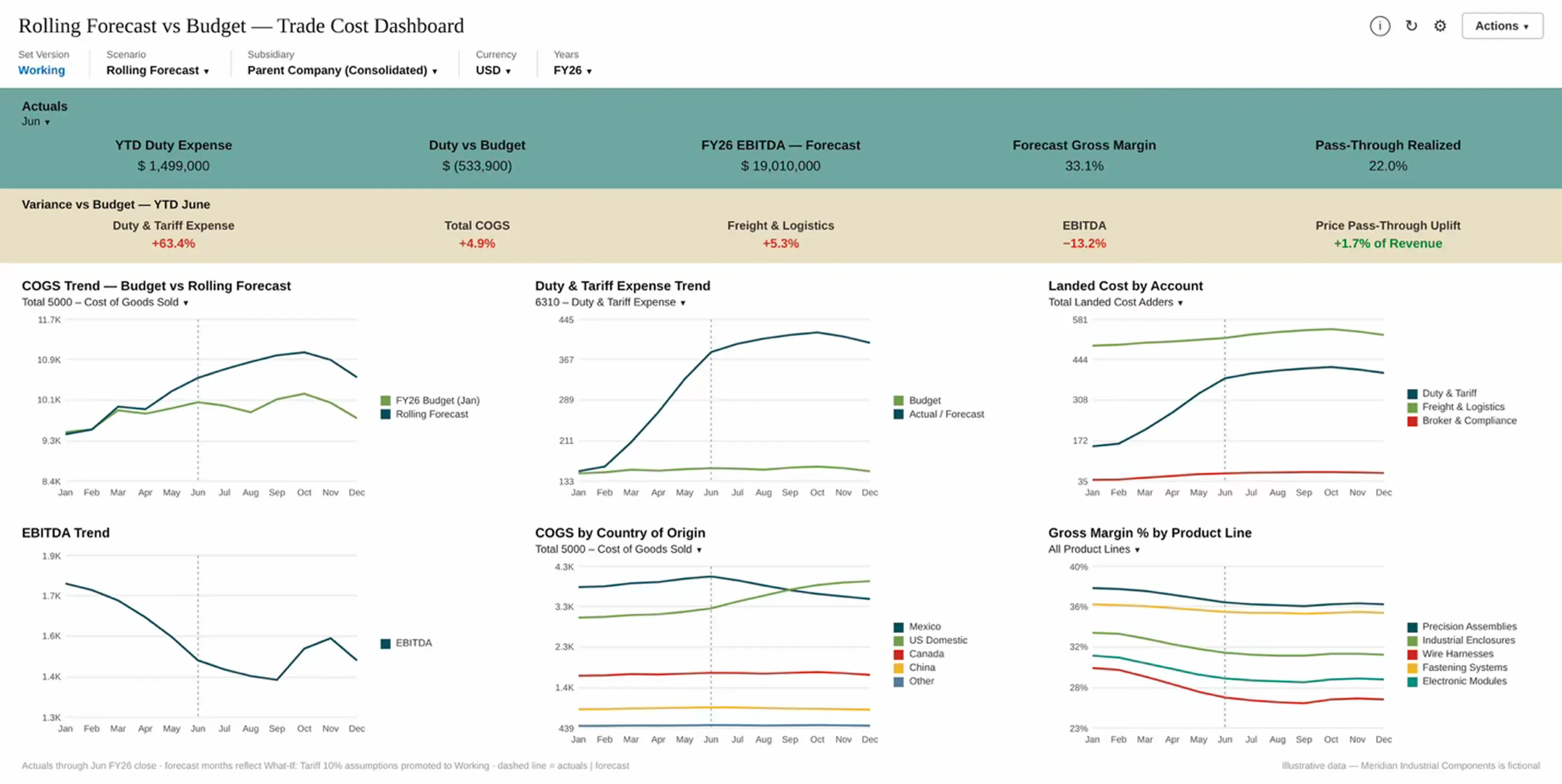
With NSPB, actuals flow in from NetSuite as periods close, and the forecast extends forward on a consistent horizon. The budget stays as the commitment; the rolling forecast becomes the operating truth. When trade terms shift in March, your outlook reflects it in March, not in next year’s plan. A rolling forecast vs. budget variance dashboard belongs here too: it tracks where tariff-driven cost increases are actually landing against plan, which mitigations are working, and how the full-year outlook is moving, with drill-through to the underlying NetSuite transactions when a variance needs explaining.
4. Rapid Version Comparisons
Scenarios answer “what if the world changes.” Versions answer a different question: “how has our own plan changed, and why?” NSPB maintains a version dimension alongside scenarios, so the same forecast can exist as a Working version, a What-If version, and an approved Final version, all in the same model.
The operational advantage is speed. When a new tariff announcement lands, you don’t rebuild anything: you copy the current working version in minutes, apply the new assumptions, and you have a clean comparison baseline while the live plan stays untouched. Finance can hand leadership a side-by-side view (pre-announcement plan versus post-announcement outlook, or January’s board version versus today’s working version) with variance calculated automatically on every line.
In a spreadsheet world, this is the work that consumes a week: someone saves “Budget_v7_FINAL_tariff_case.xlsx,” links break, and nobody is sure which file the CFO saw. In NSPB, versions live in one governed model with a clear record of what changed and when. During a year of annual trade reviews, that audit trail isn’t a nice-to-have; it’s how you explain to the board, in April, exactly how and why the outlook moved since January.
Two Reports to Stand Up Now
If your team is deciding where to start, these are the two NSPB reports we’d expect finance teams to lean on hardest through a period like this:
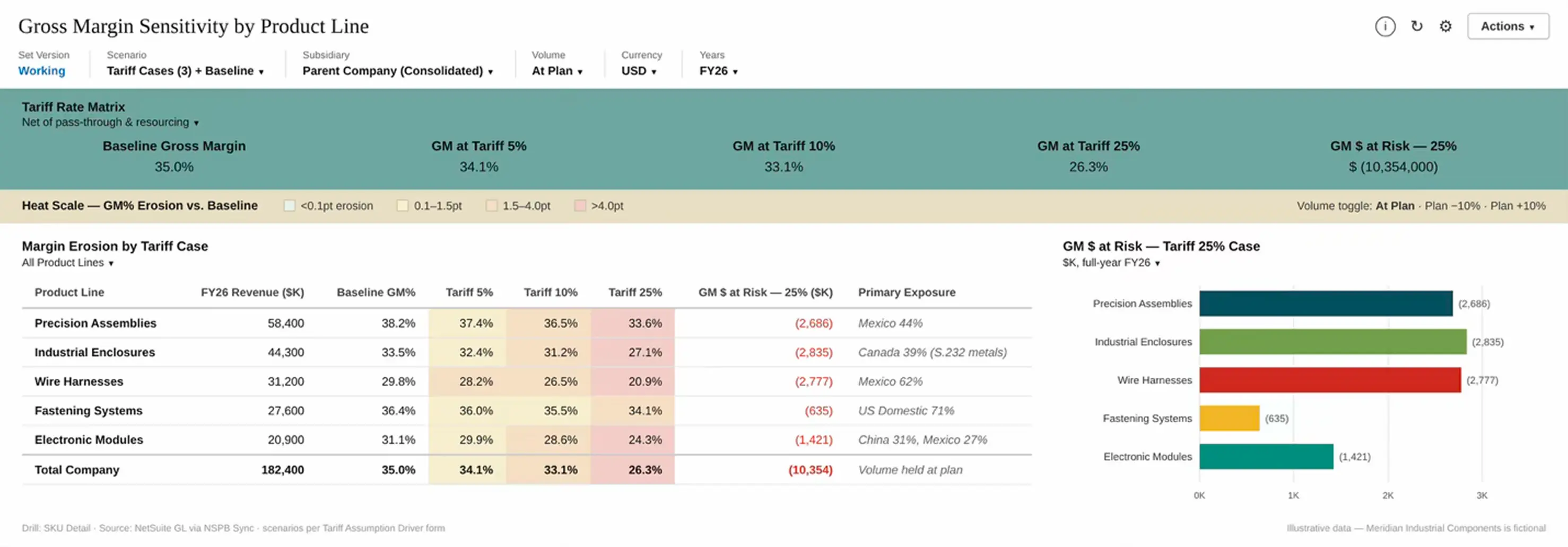
Gross Margin Sensitivity by Product Line.
Shows margin and EBITDA impact at each tariff rate, by product line and at multiple volume assumptions, so leadership can see exactly which products absorb a 10% increase and which ones can’t. This is the artifact boards and lenders ask for first, and NSPB’s driver-based model produces it without side calculations.
Scenario Comparison Report.
Compares the financial impact of multiple tariff or sourcing assumptions side by side (revenue, margin, EBITDA, and cash) so leadership can see the spread of outcomes in one view rather than across five spreadsheet versions.
One caution from the field: don’t stop at the P&L. Tariffs hit all three statements: cost of goods on the income statement, inventory value on the balance sheet, and cash timing in between, because duties are paid at import while customer cash arrives months later. A margin-only view understates the risk; make sure at least one report carries the impact through to working capital and cash.
And before any of these reports can be trusted, you need one foundational view: cost of goods exposure by country of origin and supplier. You can’t model what a tariff does to your business until you know what share of your COGS is actually exposed to it. If that data lives cleanly in NetSuite, NSPB inherits it; if it doesn’t, that’s the first gap to close.
None of these reports requires exotic configuration. All of them require a planning model that’s properly connected to your NetSuite data, which is where implementation quality shows up as decision speed.
The Bottom Line
No one can tell you what North American trade policy looks like in eighteen months, including the people negotiating it. What a finance team can control is how fast it converts a policy change into a decision. That’s a systems capability, and it’s buildable now: scenarios modeled before you need them, sourcing alternatives priced before you’re forced to choose, and a forecast that moves as fast as the news does.
At Myers-Holum, we help finance teams build exactly this in NSPB, on a foundation aligned with the NetSuite data they already trust. If tariff uncertainty is on your board’s agenda this quarter, the best time to build the scenario model was before the review. The second-best time is now.
Myers-Holum, Inc. | NetSuite Alliance Partner of the Year
Fact basis (verified July 6, 2026): U.S. opted not to extend USMCA for a 16-year term at the July 1, 2026 joint review; agreement remains in force through 2036 under an annual review process (CSIS, Brownstein, Reuters coverage). Section 232 tariffs already apply to certain steel, aluminum, and copper imports and non-U.S. auto content (Atlantic Council). Verify current status before publishing.






.svg)
.svg)

